TRAIL ANALYSER
Your watch recorded the race.
4watts explains it.
Turn your trail race FIT file into actionable performance insights.
Discover how you performed across different terrain, how your performance changed as fatigue accumulated, where you lost time, and how your run/hike strategy evolved throughout the race.

How it works
From FIT file to performance insights
After your race, simply upload the original FIT file from your sports watch.
4watts analyses your race across different terrain types and throughout the full race progression. Complex race data is transformed into clear performance metrics, visual insights and practical takeaways.
1 — Upload your FIT file
Upload the original activity file from your sports watch. A FIT file is the file created by your Garmin, COROS, Suunto or Polar watch containing the detailed data from your race. Not sure where to find it? See how to download your FIT file.
2 — We analyse your race
Your race is broken down by terrain, movement strategy and race progression.
3 — Receive your report
Get your personal 7-page 4watts Trail Race Performance Report.
What will you discover?
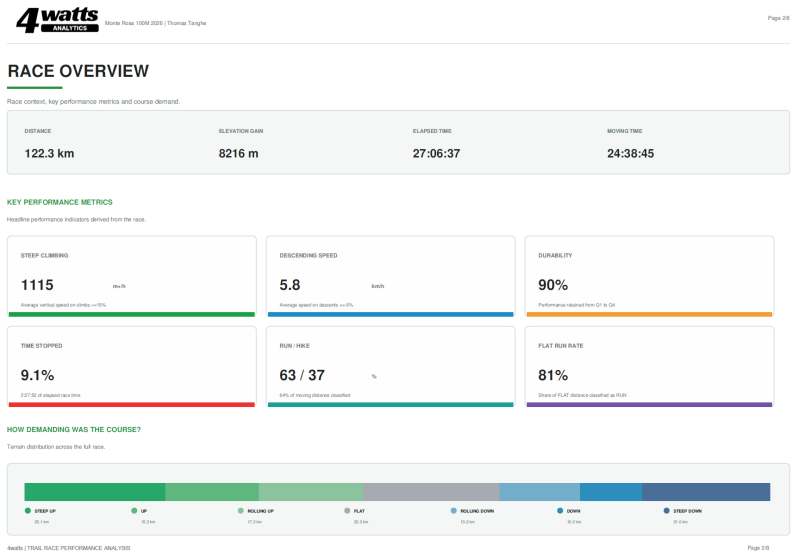
STEEP CLIMBING · DESCENDING SPEED · DURABILITY · TIME STOPPED · RUN / HIKE · FLAT RUN RATE
Go beyond average pace and finish time.
See how your climbing performance developed throughout the race, how much of the course you ran versus hiked, how your running changed under fatigue, where you stopped, and how your performance differed across terrain types.
Free Early Access
Analyse your trail race
Upload your FIT file (the original activity file from your sports watch) and receive your personal 4watts Trail Race Performance Report.
FREE EARLY ACCESS
We're opening the Trail Analyser to trail runners while we continue to validate and improve the analysis across different athletes, races and devices.
Your personal report is completely free during Early Access. By taking part in Early Access, you also help us build a better understanding of trail-running performance.
Maximum file size: 10 MB.
Is your FIT file larger? Send it to analytics@4watts.be together with your name, race name and race date.
How to download your FIT file
A FIT file is the original activity file recorded by your sports watch. It contains detailed data such as GPS, speed, elevation, heart rate and cadence. For the Trail Analyser, always use the FIT file rather than GPX if possible.
Garmin
On a computer, open Garmin Connect → Activities → All Activities → open your race → click the ⚙️ icon → Export File / Export Original. The downloaded file will normally be a .fit file. Garmin
COROS
Open the COROS app → Activities → select your race → tap the three dots/share menu in the top-right → Export Data → .FIT → save or share the file. COROS Help Center
Suunto
Open the Suunto app → select your race → tap the three dots in the top-right → choose Export/Download FIT file → save the file to your phone. Suunto
Polar
On a computer, open Polar Flow → Diary → select your race → Export in the top-right → choose FIT file. The file will be saved to your Downloads folder. Polar Support
Then simply upload the .fit file to the 4watts Trail Analyser.